| Type |
|
| Installation Features |
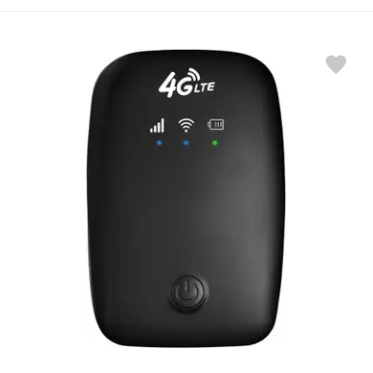
- 1. Install the SIM card Remove the back cover of the product and insert the SIM card according to the body logo. Please remove the isolation film of the battery pins!, 2. WiFi connection For MIFI equipment, long press the front power switch of the product for 6 seconds, successfully start the power on and inject the network. The green light is always green, and the green light flashes slowly after the user connects. Its WiFi name (SSID): 4G-MIFI-XXXX Password: 1234567890, 3. Manage the background Use the computer to connect to the WiFi of the device, open the browser, enter 192.168.100.1 in the address bar to enter the background landing page. Default user name: admin Password: admin (please note: all lowercase) Enter the password and log in to the management interface., 4. Modify the WiFi name and password Home >> WLAN Access Point Settings >> Modify the device’s WiFi Name (SSID), password, click Change.
|
| Model |
- 4G LTE Wireless Dongle with All SIM Network Support | WiFi Hotspot up to 150Mbps
|
| Controls |
- 1. Power Button Control Long Press (6 seconds): Turns the device ON/OFF. LED Indicator Lights will turn on to show the status., 2. Web Interface Controls (via browser) Access: http://192.168.100.1 Login: Username: admin Password: admin (lowercase), 3. Reset (Optional – some models only) Small pinhole button at back or side Press and hold for 5–10 seconds to factory reset the dongle
|
| In The Box |
- 1 X Dongle, 1 X USB to Type C Cable, 1 X Manual
|
| LED Indicator |
- Battery indicator light: red and green double color: Battery power is 25%–100%, the green light is always on; Battery power is 25%–10%, and the red light is always on; Battery power is below 10%, the red light is quickly flashing;, Signal indicator light: red and green double color: No signal. The red light is always on; Signal value of qualified green light is always on; Dial-up success can be normal Internet access, the green light slowly flashing.
|
| Supported Software |
|
| Series |
|
| Color |
|